
Every blueprint ships with source code, sample data, and step-by-step instructions — ready to run on your Cloudera Platform
-
Blueprint Card
Overview
This blueprint connects Mistral Vibe—Mistral’s terminal coding agent—to your Cloudera AI Inference (CAII) model endpoint using a custom Workbench runtime image that preinstalls Vibe and automatically syncs configuration from project environment variables, enabling a private, enterprise-hosted agent workflow on Cloudera without routing traffic through public APIs.
Prebuilt runtime images and standardized configurations eliminate repetitive setup and reduce deployment errors, driving significant cost savings and cost avoidance across teams. Organizations can launch private AI use cases faster by leveraging existing enterprise controls, directly accelerating revenue growth. Together, these efficiencies streamline operations while ensuring secure, scalable AI deployment.
Demo
This interactive Reprise demo showcases how to use Mistral Vibe on CAI Workbench after seamlessly deploying the model using the CAI Inference service.. Watch the demo
Key Features
Ready-to-use workspace environment pre-configured with Mistral Vibe and built-in developer tools
Pre-packaged image ensures simple setup without needing custom container builds
Secure, automatic configuration directly from environment variables without saving sensitive tokens to disk
Standardized AI integration that seamlessly connects with Cloudera AI Inference endpoints
Use Case
Problem: Teams want agentic coding (shell, edits, search) on models they operate inside Cloudera, with CDP authentication and existing CAII deployments.
Outcome: Deploy Devstral on CAII, register this runtime, set three env vars, and get started agentic coding in a workbench terminal!
Architecture
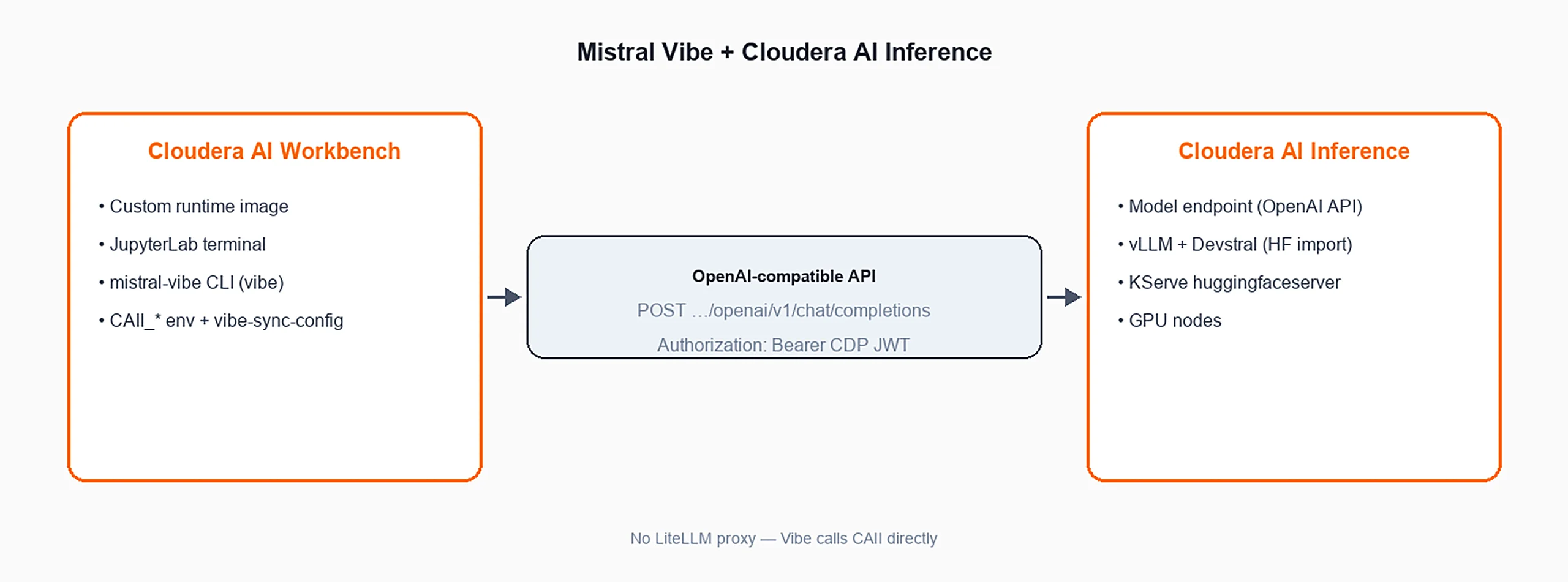
Cloudera AI Workbench hosts a custom runtime image equipped with the Mistral Vibe CLI and developer tools. It interacts directly with Cloudera AI Inference over an OpenAI-compatible API using bearer CDP JWT authentication. This allows agentic coding tasks to execute securely without routing traffic through third-party proxies.
Your form submission has failed.
This may have been caused by one of the following:
- Your request timed out
- A plugin/browser extension blocked the submission. If you have an ad blocking plugin please disable it and close this message to reload the page.