
Every blueprint ships with source code, sample data, and step-by-step instructions — ready to run on your Cloudera Platform
-
Blueprint Card
Overview
This Blueprint turns a set of Cloudera AI Applications into a live Ray cluster and gives you a single REST API to deploy, scale, place, and monitor inference workloads on it — vLLM and SGLang LLMs, a LiteLLM gateway, YOLO vision models, MCP tool servers, or any custom Ray Serve app.
Establish a consolidated serving architecture for open-source AI models and microservices using Cloudera AI Workbench. By pairing Ray Serve with isolated runtimes and single-endpoint request routing, this setup streamlines deployment workflows, optimizes pooled hardware resources, and delivers continuous operational health telemetry. Independent scaling rules dynamically adjust replica counts and worker node provisioning, complemented by configurable guardrails to spin down unused capacity.
An Applied ML Prototype accelerates initial deployment, alongside network configurations to guide multi-node compute clusters—allowing engineering teams to maintain governance and system validation.
Sharing GPU and CPU capacity across AI use cases lowers operating effort, avoids overprovisioning, and scales capacity with demand. Additionally, it accelerates AI delivery with a reusable path to production and enables cross-node GPU usage for larger models.
Demo
Follow the workflow from AMP setup to a working model endpoint: choose initial resources, inspect the Ray cluster, deploy a vLLM model, send an OpenAI-compatible request and open the monitoring dashboards. Watch the demo
Key Features
One API for flexible serving: deploy vLLM, SGLang, LiteLLM, MCP workloads and other microservices with isolated engine dependencies.
Declarative GPU placement: express tensor parallelism and resource constraints, including cross-pod inference when networking is configured.
Capacity that follows demand: combine vLLM replica autoscaling with CAI worker provisioning that accounts for existing and starting capacity.
Controlled resource lifecycle: choose initial pools and optional budgets; automatically retire only eligible idle, controller-owned workers.
Integrated operations: use authenticated dashboard access, Prometheus/Grafana monitoring and recovery workflows backed by persisted deployment intent.
Use Case
ML engineers and platform teams require a consolidated infrastructure to handle dynamic model workloads without maintaining dedicated, fixed serving stacks for individual use cases. While a solitary CAI application remains constrained by its fixed allocation, integrating Ray clusters aggregates multi-application compute to support unified serving and distributed inference. Deploy this architecture to host AI assistants, API gateways, and agent tool servers through routed endpoints, with dynamic replica adjustments and worker node scaling to meet shifting demand. Provision initial infrastructure tailored to current requirements while establishing configurable capacity guardrails, strictly governed by underlying GPU availability and CAI admission controls.
Architecture
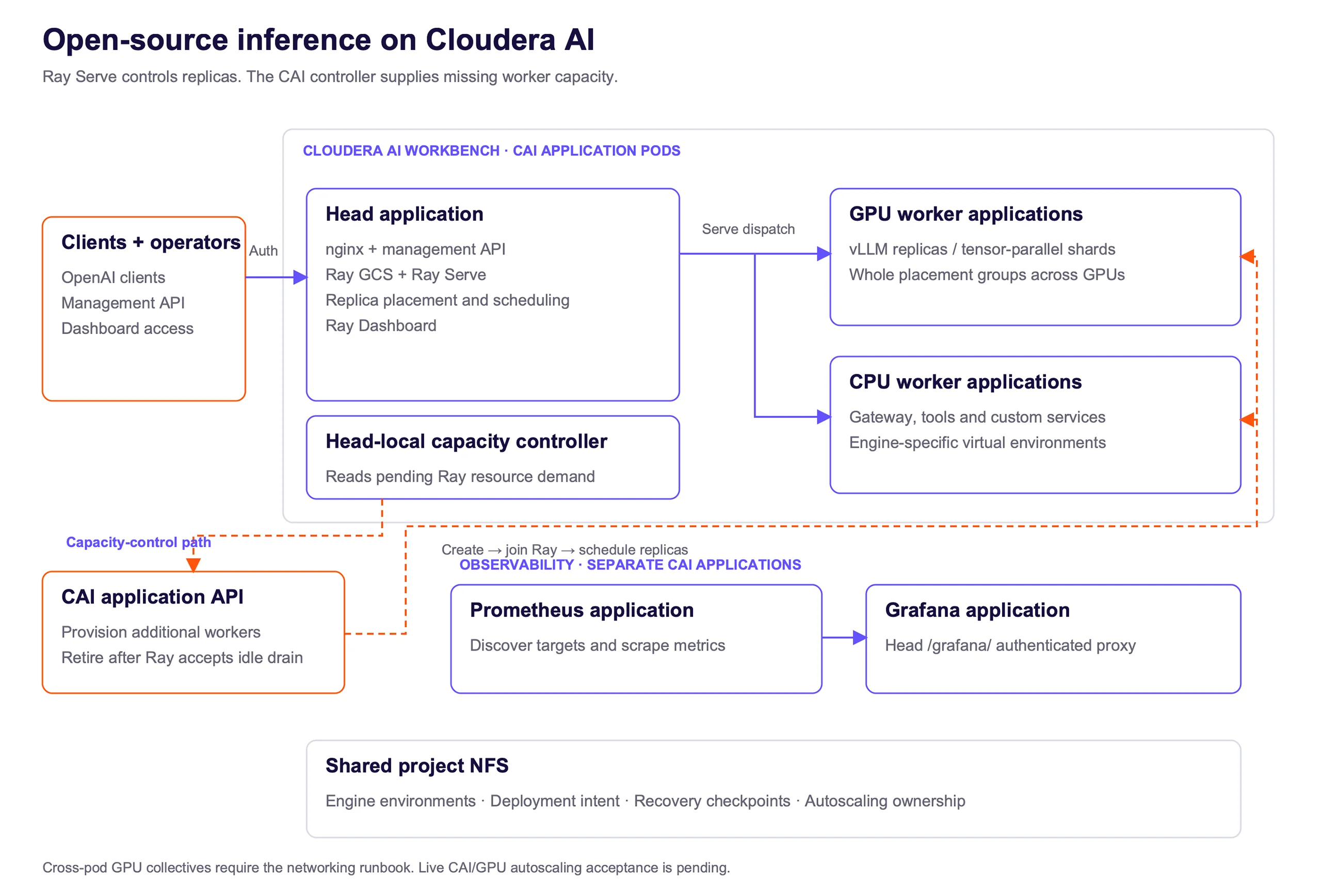
A CAI application runs the Ray head, nginx ingress, the management API and the worker-capacity controller. Additional CAI application pods join as CPU or GPU Ray workers. Ray Serve schedules model deployments; tensor-parallel replicas reserve complete placement groups with one GPU per executor bundle. Engine virtual environments and durable project state reside on shared NFS. Ray Serve controls replica count, while the capacity controller evaluates unmet Ray demand and calls the CAI API for missing workers. Empty-worker retirement uses a rejectable Ray idle drain before deleting the owned CAI application. Prometheus and Grafana run as separate CAI applications; Grafana access is proxied through the authenticated head origin. Cross-pod collectives require the documented Istio configuration.
Your form submission has failed.
This may have been caused by one of the following:
- Your request timed out
- A plugin/browser extension blocked the submission. If you have an ad blocking plugin please disable it and close this message to reload the page.