
Automate Tasks and Improve Data Practitioner Efficiency
There are quite a few mundane tasks a data scientist or AI engineer does as part of their daily workflow—like uploading datasets, running and iterating the same scripts for different hyperparameters, observing experiments, and so on. Offloading these tasks to an AI agent could save resources and add significant value.
That’s where the Cloudera AI Workbench MCP Server comes in: it’s an open-source Model Context Protocol (MCP) server designed to better integrate with your agentic workflow.
What Cloudera MCP Server Is and How It Helps
Cloudera’s MCP Server acts as a secure translator. It enables assistants (like Cloudera AI Agent Studio, Claude, or Cursor) to execute tasks directly inside your Cloudera AI Workbench environment.
This means you can ask your assistant to list projects, upload files, and run jobs, and the server will carry out the action using the platform's standard APIs.
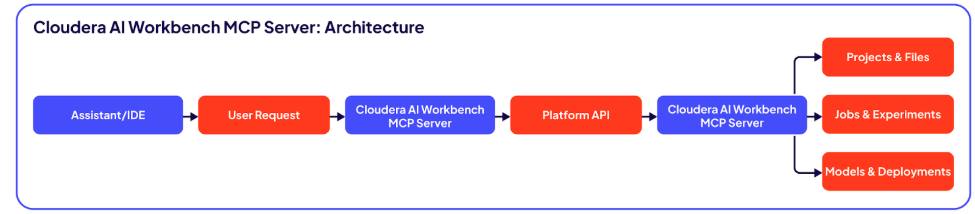
Figure 1. Cloudera AI Workbench MCP Server: Architecture
Integrates with Existing Governance
Cloudera MCP Server is designed to work with your existing enterprise governance, not bypass it.
For data scientists and AI engineers: This can help reduce context switching, allowing you to stay in your chat or IDE while initiating platform tasks. The assistant can handle the coordination, while the platform handles the execution.
For platform and MLOps teams: It will help with triggering an eval script, uploading new datasets, and running similar test runs. The integration also allows application updates, deletes, and restarting and tracking experiments.
Security by Design
Security is a core component of the server's design, intended to fit within an enterprise environment.
STDIO transport: By default, it uses Standard Input/Output (STDIO) for communication between the assistant and the server. This avoids the need to open and manage a new network endpoint for this interaction.
Credential management: The server is designed to read credentials from Docker secrets or environment variables, avoiding the need to hard-code keys or pass them in command-line arguments.
Easy access: It uses your existing Cloudera AI Workbench API keys, allowing you to scope permissions appropriately for different users and use cases.
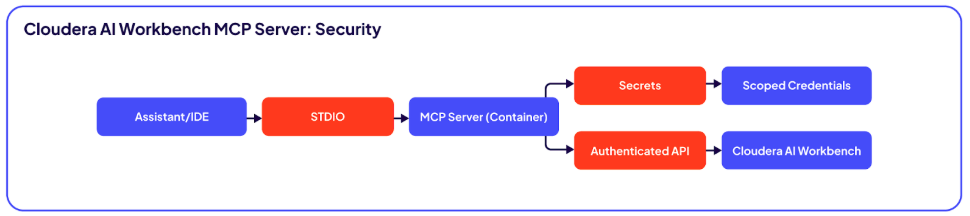
Figure 2. Cloudera Workbench MCP Server: Security by Design
How to Get Started with Cloudera MCP Server
Cloudera MCP Server is designed to help your assistants interact directly with your platform, all while operating within your established governance.
Getting started is a straightforward process:
- Configure the server: Run the open-source server in Docker, providing your Cloudera AI Workbench host and API key as secrets
- Connect your client: Point your preferred MCP client (like Cloudera Agent Studio) to the server using its STDIO command
- Make your first request: You can test the connection by asking your assistant to "list my projects”
Example Workflows
Here are some examples of tasks you can perform through an assistant connected to the Cloudera MCP Server:
List all my active projects and show me any jobs that are still running
Upload the new-data-august.zip file to the “fraud-detection” project
Create a job using the train-v3.py script, give it 2 CPUs and 8GB of memory, and run it
Log these metrics to the experiment named “resnet-sweep” and tag the run with “new-data”
Take the latest model build and deploy it to the staging endpoint
Restart the “gradio-demo” application
The server includes tools to support these workflows across the project lifecycle, including file management, job execution, experiment tracking, model deployment, and application management.
Learn More
For detailed setup steps, examples, and a full list of capabilities, please visit the Cloudera MCP Server GitHub repository. Note: GitHub projects are provided as-is and are not formally supported by Cloudera. The Cloudera MCP Server project is made available under the Apache 2.0 license, and Cloudera provides no warranty, support, or maintenance for its use.
To learn more about how MCP and Cloudera work together, check out our blog Bringing Context to GenAI with Cloudera MCP Servers.